Open source GTM agent
Your GTM tool says send more. This one says not yet.
Find prospects and run founder-led outreach. Check the readiness signals before you scale.
- Play
- civic-pilot
- Action
- Profile enrichment
- Outcome
- Meeting booked
Before you scale
Know when to wait.
Before product-market fit, focus on learning what works. The gates show what to fix before you hire a sales rep or scale outreach. You can override them.
Are you ready to scale?
Sean Ellis 40%+ sustained for 2+ months?
not yetAll six questions
- Sean Ellis 40%+ sustained for 2+ months?not yet
- Inbound > outbound for the first time?trending
- Same 3 discovery questions predict close?partial
- Week-8 retention curve flat?not yet
- 3-sentence pitch + customer self-identifies?yes
- NRR > 100%?unknown
The receipt
Your real CAC, not a blended guess.
Every paid call returns a signed receipt. When a deal lands, its value is tagged back onto the receipts that earned it.
$2,002.27
signed spend, 66,468 receipts
8
deals won
$250.28
per deal won
$48,000 closed on $2,002.27 spent · 24.0× on spend
One seeded install with fictional prospects, priced at the demo seed’s own figures, which run higher than OneShot’s.
The layer underneath
Built on OneShot, priced by OneShot.
OneShot is the pay-per-use API underneath. oneshot-gtm records what it charged, to the cent, with no markup.
Before it runs
- A OneShot wallet
- CDP keys or an agent key. Gmail and Smartlead sends cost nothing.
- Your own LLM key
- OpenRouter, OpenAI or Anthropic. No prompt is hidden.
- Bun 1.3 or newer
- Not a Node package. The runtime check fails loudly.
What a call costs
- web.search
- $0.001
- email.verify
- $0.001
- email.find
- $0.005
- enrich.profile
- $0.005
- local.search
- $0.010
- enrich.company
- $0.005
- research.person
- $0.050
- email.send
- quoted
Prices and endpoints are published by OneShot.
Two surfaces
A terminal and a dashboard over one local ledger.
One SQLite file in your home directory. 78 commands on one side, 11 pages on the other. Nothing syncs.
oneshot-gtm find watch --oncescanned 31 · enqueued 3 · rejected 12 · $0.41oneshot-gtm cadence advancepolled 3 mailboxes · 59 replies · 24 bounced95 due · 59 held (reply detected)
Draft from what you know
Research and reply history shape each prospect’s outreach angle. First touches, follow-ups and reply drafts use it, including what to avoid saying.
Browse prospectsReview a letter before it goes out
Send letters to named contacts at U.S. business addresses. Review the proof and price, then approve each letter individually. Bulk actions never send letters.
See direct mail in Plays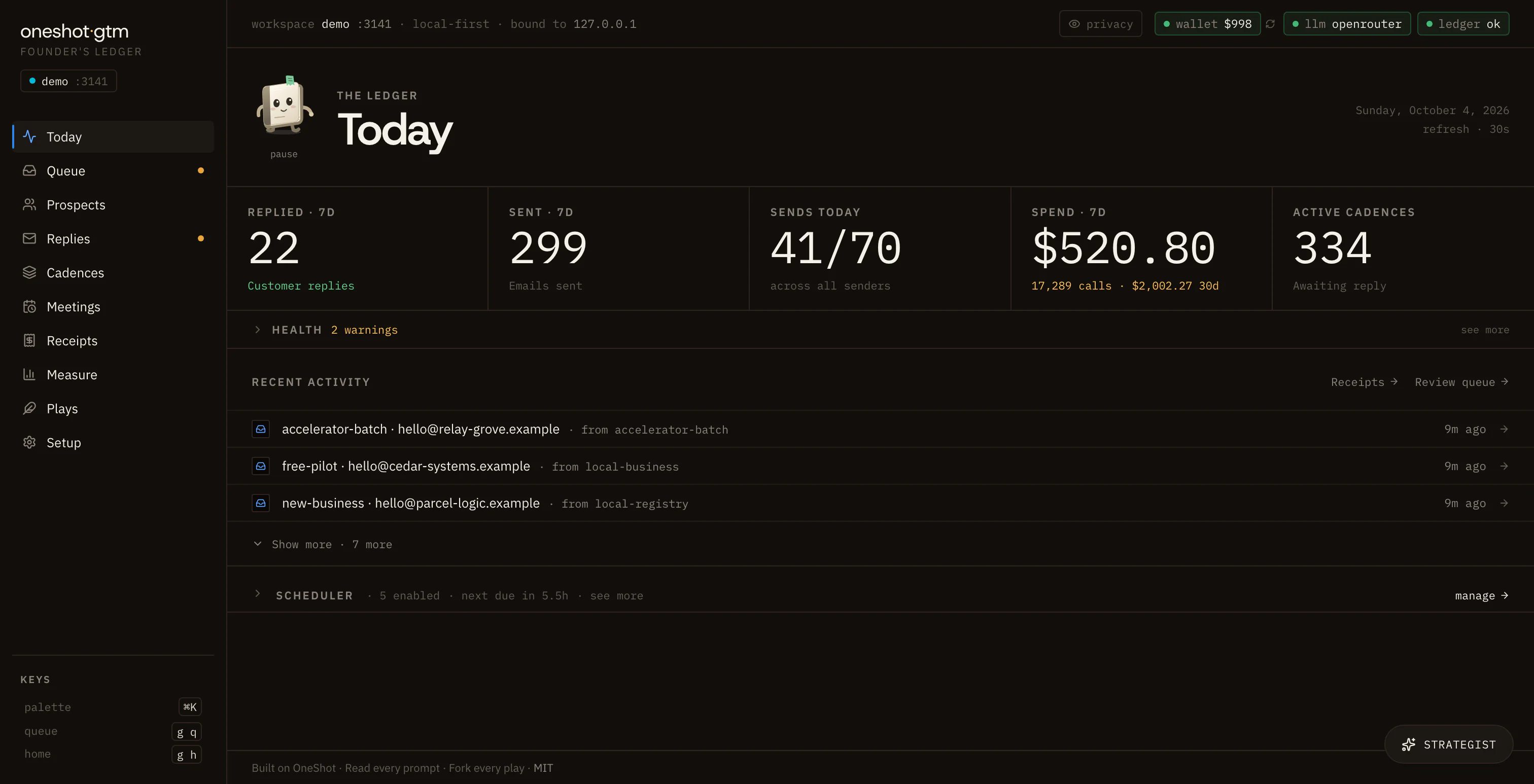
The plays
The product is the playbook.
Pre-PMF plays with the approach, the ask and the follow-up built in. The prompts are yours to change.
Who has the problem?
Interview, synthesize what you hear, refine the ICP.
- discover icp interview-prep
- discover icp synthesize
Will they try a solution?
A discovery interview or a free pilot. Bigger buyers get a scoped pilot and a letter of intent.
- discovery-interview
- free-pilot
- design-partner-loi
Is it time to scale?
Run the PMF survey. The gates name what needs work before you template or hire.
- discover pmf survey
- handoff readiness
All 23 play names
- show-hn
- post-funding
- job-change
- accelerator-batch
- hiring-signal
- podcast-guest
- repo-interest
- stack-consolidation
- competitor-switch
- luma-events
- breakup-revive
- concierge
- demo-no-show
- x-repost-intro
- x-amplify
- x-amplify-dm
- profile-intro
- sources-sought
- civic-pilot
- design-partner-loi
- discovery-interview
- free-pilot
- new-business
Where the targets come from
Find the right people.
Public signals become prospects. Check the fit, then approve the outreach.
Signal
Find a prospect
Prescreen
Drop invalid inputs
ICP check
Check source and person
Your approval
Review before sending
People and companies
Roles, funding rounds, hiring and accelerator cohorts.
Public conversations
Show HN posts, podcast guests, Luma events and X reposts.
Code and company lists
GitHub topics and stars, adopter lists, sponsors and customer pages.
Local businesses
Places, business licenses, healthcare registries and carrier records.
Government and civic work
Contracting notices and council agendas.
Your own contacts
Imported prospects, profile URLs and earlier conversations in your ledger.
One show-hn run, from the demo ledger
$0.41 for the whole run
Explore all 16 finders
Finders start off. Choose your sources or apply an industry pack.
- show-hnopt in
- post-funding-autoopt in
- accelerator-batchneeds config
- job-changeneeds config
- hiring-signalneeds config
- podcast-guestopt in
- github-topicsneeds config
- github-starsneeds config
- luma-eventsneeds config
- gov-solicitationneeds config
- civic-agendaneeds config
- breakup-reviveopt in
- x-repostersneeds config
- local-businessneeds config
- local-registryneeds config
- list-pageneeds config
Start with your industry
Packs cover restaurants, trades, healthcare, auto services, professional services, trucking, civic work and vertical AI startups. Apply one to configure the relevant finders, then fill in your offer and any missing settings.
Explore industry packsGive background work a daily budget
Run finders as a macOS or Linux service. Set a daily spend ceiling for finders and drains; manual sends remain available when the ceiling is reached.
Set up background monitoringAgainst the category
Why not Apollo, Clay, Fuse or ZoomInfo?
Most GTM tools assume you have product-market fit and optimize sends. Most pre-PMF founders don’t, and end up scaling a broken motion because the tool said “send more”.
Premature scaling was the Startup Genome Report’s top documented cause of startup death. So the discipline is built in:
Less plumbing. More time with customers.
OneShot handles the data providers and delivery. The playbook connects discovery, research and follow-ups, with your approval before outreach and a signed receipt for every paid action.
Find the person
Data through OneShot

People & companies
Find contacts that fit your ICP
Email discovery
Find a work email
Profile enrichment
Research the person behind the address
Local businesses
Look up businesses by place
Check the details
Lookups through OneShot
Email verification
Check the address before sending
Company research
Understand what the company does
Web research
Read the source behind the signal
Person research
Ground the approach in their work
Make contact
Drafting and delivery
Email
OneShot, or your own mailbox
LinkedIn messages
OneShot · your connected account
X DMs
Personal outreach on X
SMS
OneShot · demo no-show play
Direct mail
OneShot · letters you approve
Voice calls
OneShot · concierge play
The product is the playbook.
Run the pre-PMF plays. Review the case before sending. Earn the next step before you scale.
- ICP gates
- Your approval
- Signed receipts
The practical differences
| Capability | Category / examples       | oneshot-gtm |
|---|---|---|
| Workflow setup | Cargo lets you define GTM workflows in code and deploy them to its platform. | Start with editable pre-PMF plays. OneShot handles provider lookups and delivery; GTM connects the steps. |
| Background work | Cargo hosts triggered workflows, retries failed steps and traces each run. | Run finders as a service on your machine, with a daily spend ceiling. Paid actions produce signed receipts linked to outcomes. |
| Universal inbox | Fuse offers a consolidated inbox across channels | One inbox for OneShot + Gmail replies. Reply in place, with research-grounded drafts. Smartlead is send-only. |
| Power dialler | Fuse includes a power dialler | Voice calls in the concierge play, via CLI. No power or parallel dialler. |
| Enrichment | Clay runs lookups across multiple providers | Contact enrichment, email verification and local lookups through OneShot, paid per call. |
| Follow-ups | Compare sequencing and reply handling | Cadences stop on human replies detected through OneShot or Gmail. Sending identities ramp with daily caps. |
| Review before send | Compare approval and research controls | A queue with the prospect’s case, research and draft together. Approve before sending. |
| Learn from outcomes | Compare reporting and attribution | Tag replies and deal value back to the play. Track spend and return against signed receipts. |
| Pricing | Compare platform fees and usage charges | Pay per result, no subscription |
| Source visibility | Compare ownership of the runtime and prompts | MIT; read the prompts, fork the plays |
| CAC story | Compare cost and outcome attribution | Signed per-call receipts, exportable |
| PMF posture | Compare readiness checks before scaling | Pre-PMF aware, soft-gates on scale moves |
| LLM | Compare model access and key ownership | Bring your own key |
| State | Vendor cloud | Local SQLite, chmod-600 dotfile |
Scope
Where it stops.
Run an SDR
This helps you do founder-led sales. It refuses to advise a first-AE hire pre-PMF.
Manage SPF, DKIM, DMARC
Handled by OneShot
OneShot auto-provisions and warms sending domains.
Hold your customer data
Local SQLite ledger only.
Lock you into our LLM
Bring your own key, swap providers freely.
Auth, multi-user, hosted DB
Local-first stays local.
Wrap itself in Electron
bunx oneshot-gtm-server opens your browser. That is enough.
Questions
Before you start.
What can I do before product-market fit?
Find people who fit your customer profile, prepare discovery interviews, and run founder-led outreach. The readiness gates help you decide when to template the motion or hire your first sales rep.
What runs automatically?
You choose which finders run and can stop cadences. Follow-ups run automatically and stop on reply. Physical letters need individual approval, even when they are part of a cadence.
What do I pay for?
The software is free. You pay OneShot for API calls and your chosen LLM provider for model use. There are no seat fees or software subscriptions. Set a daily spend ceiling for finders and drains; manual sends remain available.
Can I use my existing mailbox?
Yes. Connect Gmail or Google Workspace, or use OneShot sending domains. Smartlead mailboxes can send too, but their replies stay in Smartlead. Bounce handling is Gmail-only.
How do I get started?
Try the read-only demo first. To run your own dashboard, install Bun and run bunx oneshot-gtm-server. Setup needs a OneShot wallet, your LLM key and a sending identity. The CLI is available from a repo clone.
Read every prompt. Fork every play.
MIT and local-first. Nothing about your prospects leaves your machine.
bunx oneshot-gtm-serverThe dashboard, installed from npm without a clone.
git clone https://github.com/oneshot-agent/oneshot-gtmThe 78 commands, plus every prompt. Then bun install and bun link from apps/cli.
The plays and the prompts are plain files in that clone. Read them yourself, or point Claude Code, Codex or Hermes at the repo and have it do the reading.